Running an aesthetic clinic can feel like juggling a dozen priorities at once. You’re looking after patients, managing appointments, monitoring treatment plans and dealing with endless admin in the background. A well-chosen CRM for clinics acts as a central hub for all of this – helping you organise patient information, streamline communication and support sustainable revenue growth, without turning your clinic into a sales machine.
Rather than being “just another piece of software”, a good CRM becomes a super-organiser for your patient management, helping you improve efficiency, support compliance and ultimately deliver a smoother, safer experience for your patients and clients.
Key Takeaways
A CRM for clinics helps organise patient information, making it easier to manage appointments, records and follow-up care.
Automating communication means fewer missed appointments and more consistent patient engagement.
Gaining data-driven insights from patient activity helps you tailor services, support aesthetic clinic marketing and improve decision-making.
For UK clinics, compliance with data protection law (UK GDPR and the Data Protection Act 2018) is vital for secure patient messaging and data handling.
Using a CRM can free up staff time, allowing them to focus more on face-to-face patient care instead of admin.
1. Streamlined Appointment Scheduling
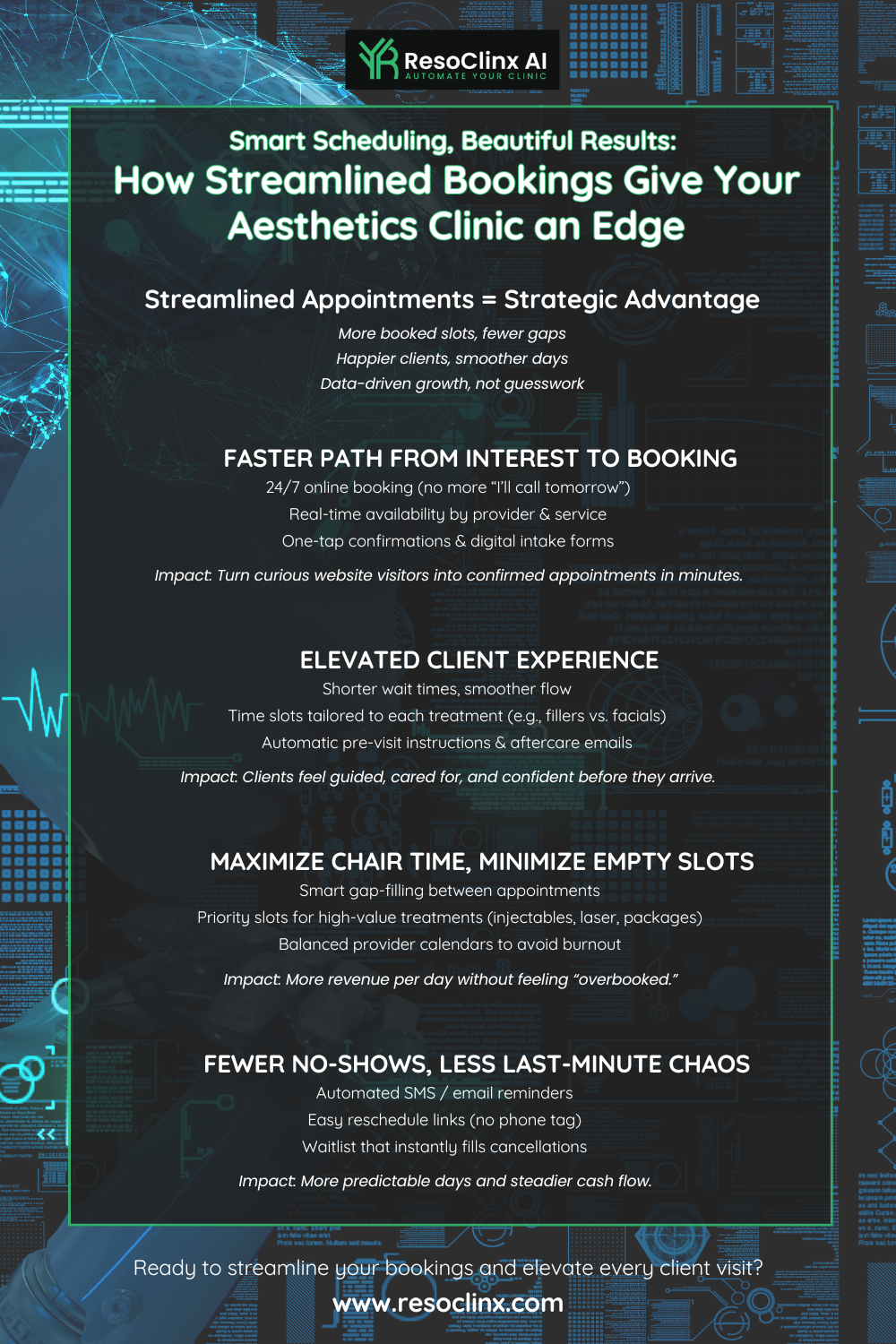
Getting patients booked in shouldn’t feel like a chore – for you or for them. A good CRM system makes the whole process faster, clearer and more convenient.
Your front desk team often spend a lot of time on the phone, juggling calendars and sending out reminders. This takes them away from other important tasks, such as welcoming patients when they arrive or answering clinical queries. A CRM helps by centralising your diary and automating routine steps.
With the right CRM, you can offer online booking options. Patients can see available time slots and book themselves in at a time that suits them, day or night. This is a big win for patient convenience and it dramatically cuts down on those endless back-and-forth calls.
Because a CRM can automatically send reminders via text or email, it also supports better attendance rates. Automated confirmations and reminders help reduce no-shows, keeping your schedule full and helping you attract more clients on a consistent basis.
Here’s how a streamlined scheduling system helps:
Reduces administrative workload: Frees up your staff to concentrate on patient care and in-clinic experience.
Minimises no-shows: Automated reminders and easy confirmation options keep patients on track.
Improves patient satisfaction: Offers a convenient, modern and user-friendly booking experience.
Increases clinic efficiency: Optimises the use of your appointment slots and reduces wasted time.
The ability for patients to book their own appointments online, coupled with automated reminders, is a game-changer for clinic operations. It not only saves your team valuable time, but also ensures patients are reminded of important appointments, supporting better continuity of care and a more predictable income stream.
2. Unified Patient Records
Imagine trying to run a clinic where patient information is scattered across different notebooks, spreadsheets and even a few sticky notes. It sounds like a recipe for chaos, doesn’t it? That’s precisely why a unified patient record system is so important – and this is where a good CRM truly shines.
A CRM gives you a central hub for every patient’s details, making daily work easier for everyone. No more digging through old files to find a patient’s history or wondering which practitioner last spoke to them. Everything is accessible, structured and in one place.
Here’s what a unified record system typically includes:
Demographic information: Basic contact details, date of birth and emergency contacts.
Medical history: Past illnesses, allergies, medications and relevant treatment history.
Appointment history: A log of past and upcoming appointments, including notes from consultations.
Treatment plans: Details of ongoing care, therapies, procedures and recommended follow-ups.
Billing and payment data: Payment history and outstanding balances, often integrated with your billing tools.
Having all this information in one place means your team can provide more consistent and informed care. It helps avoid duplicated work or tests, reduces the chance of errors and allows for a more personalised approach to each patient’s needs.
A unified patient record system acts as the single source of truth for your clinic. It ensures that every member of your team, from reception to the consulting room, has access to the most up-to-date and complete patient information, leading to better decision-making, a smoother patient journey and a more consistent experience for every patient or client.
3. Automated Patient Communication
Keeping patients informed and engaged is a cornerstone of modern healthcare, and that’s where automated communication tools within a CRM really stand out.
Clinics handle a huge volume of messages every day – appointment confirmations, reminders, follow-ups and general queries. Trying to manage all of this manually is not only time-consuming, it also increases the risk of missed messages. A good CRM can handle a large part of this for you, without losing the personal touch.
Automation improves the patient experience by providing timely, relevant information. It means fewer missed appointments, better adherence to treatment plans and a more connected-feeling experience overall. For example, your CRM can send a personalised appointment reminder via text a few days before the visit, or a follow-up message after a procedure to check on recovery.
Here’s how automated communication can transform your practice:
Appointment reminders: Reduce no-shows by sending automated confirmations and reminders. Patients can often confirm their attendance with a simple reply.
Recall and follow-up messages: Automatically reach out to patients who are due for check-ups or haven’t been seen for a while, supporting ongoing care.
Post-procedure instructions: Send messages with aftercare instructions or links to informational resources once a treatment is complete.
General information updates: Quickly share changes to clinic hours, important notices or seasonal health information with your patient list.
The key is to strike a balance. While automation is powerful, it shouldn’t feel cold or robotic. Many CRMs allow you to customise templates so the tone matches your clinic’s voice and values. This blend of efficiency and personalisation is what truly makes a difference for both patients and staff.
4. Data-Driven Patient Insights

It’s easy to get caught up in day-to-day operations, but one of the biggest advantages of a CRM is the ability to step back and see the bigger picture. Your CRM is a goldmine of data about how patients interact with your clinic.
You can start to answer questions such as:
Who are your most frequent visitors?
Which treatments or services are most popular?
Are there patterns in appointment cancellations or no-shows?
Are certain time slots or days consistently under-used?
A good CRM helps you spot these patterns quickly, giving you insight that can shape your service offering and aesthetic clinic marketing.
Here are a few ways you can use these insights:
Identify patient preferences: See which treatments are most in demand and which might benefit from more education or visibility.
Improve patient retention: Identify why some patients may not be returning and respond with appropriate communication or service improvements.
Personalise marketing efforts: Tailor emails, SMS campaigns or educational content to different patient groups based on their needs and past treatments.
Forecast demand: Predict busy periods and popular services so you can schedule staff and resources more effectively.
Analysing patient data isn’t just about dashboards and charts – it’s about getting a clearer picture of your patient base. This allows you to refine your clinic’s offerings, support local SEO for clinics by understanding what people search and book most often, and ensure your communications are as relevant and helpful as possible.
Using CRM Insights to Support Aesthetic Clinic Marketing
For example, you might notice that a particular demographic tends to book appointments on weekday mornings. Knowing this, you can ensure you have adequate staffing at those times and reflect this in your content calendar or Google Business Profile updates, so your messaging and availability match patient behaviour. If you see a high rate of no-shows for a specific type of appointment, you can investigate why and test more targeted reminders or adjusted appointment lengths.
Ultimately, it’s about using the information you already have to make your clinic run more smoothly and serve your patients better.
5. Enhanced Patient Experience
Delivering an excellent patient experience is about more than politeness. It’s about ensuring patients feel well cared for from the moment they consider booking to long after they leave your clinic.
A good CRM supports this by making interactions smoother, more joined-up and more personal. When everything is organised – from appointments and records to follow-ups – your staff have more time to focus on the human side of care.
Here’s how a CRM can enhance patient experience:
Personalised communication: Sending thoughtful appointment reminders, follow-up messages and, where appropriate, check-ins or educational resources makes patients feel remembered and valued.
Easy access to information: Many systems allow patients to access their appointment details or documents via a secure portal, reducing the need for phone calls and making them feel in control.
Smoother patient journeys: From initial enquiry to follow-up, a CRM helps ensure each step is clear and consistent, reducing confusion and stress.
A positive patient experience rarely happens by accident. It’s the result of well-designed processes supported by the right tools. When patients feel cared for and informed, they’re more likely to return and to recommend your clinic to others.
Ultimately, a CRM helps you turn routine interactions into meaningful touchpoints, building longer-term relationships with your patients and clients.
6. HIPAA-Compliant Messaging

When you’re dealing with patient information, privacy is not optional – it’s a legal requirement. Although HIPAA is a United States healthcare privacy law, the principle is the same in the UK: clinics must handle personal health information securely and responsibly.
In the UK, clinics primarily need to comply with UK GDPR, the Data Protection Act 2018 and the common law duty of confidentiality. A good CRM should support this by providing secure, encrypted messaging, clear access controls and audit logs.
Think about all the information you share with patients: appointment reminders, follow-up instructions, pre-treatment advice and test result notifications. If that information isn’t sent securely, it could be accessed by the wrong person.
Here’s why secure, compliant messaging is so important:
Patient data protection: Safeguards sensitive health information from unauthorised access or breaches.
Legal compliance: Supports your obligations under UK data protection law and helps demonstrate robust information governance.
Professionalism: Shows patients and regulators that you take privacy and security seriously.
Reduced risk: Minimises the chance of data leaks, complaints and potential regulatory action.
If your clinic also works with patients in the US or uses US-based service providers, you may additionally need your CRM to support HIPAA requirements alongside UK regulations. A well-designed CRM with integrated secure messaging allows you to communicate confidently with patients, knowing their information is protected at each step.
7. Patient Recall and Follow-Up
Life gets busy, and patients can easily forget to book their next appointment – whether it’s a routine skin review, injectable follow-up or a course-based treatment. A good CRM makes proactive recall and follow-up much easier.
The system can track when patients are due for their next visit and automatically prompt them, helping your clinic maintain both continuity of care and a healthy appointment book.
Automated recall has several benefits:
Improved continuity of care: Patients are reminded about ongoing treatments, preventative checks or post-procedure reviews, supporting better outcomes.
Reduced no-shows: Automated reminders via text or email significantly reduce missed appointments.
Re-engagement of inactive patients: Your CRM can identify patients who haven’t visited in a while and send appropriate recall messages to bring them back into care.
This proactive approach benefits both clinical outcomes and clinic performance. Instead of your team spending hours phoning through old lists, the CRM handles much of the process, freeing staff to deliver a more personal, in-clinic experience to the patients who are already with you.
8. Medical Billing and Insurance Support
Managing the financial side of a clinic can feel like a constant juggling act, especially when you are dealing with invoices, payment plans and (where relevant) insurance claims. A good CRM can simplify much of this work.
Many systems allow you to automate routine tasks related to billing and payments, such as sending reminders for outstanding balances or notifying patients of upcoming payments. This reduces administrative burden and can help improve your cash flow.
Here’s how a CRM can make a difference:
Automated payment reminders: Patients receive timely notifications about outstanding balances or upcoming payments, encouraging prompt settlement.
Support for eligibility or documentation checks: Some systems can assist with verifying details needed before certain treatments or claims.
Status tracking: Keep an eye on the progress of payments or external claims within the CRM so you always know what stage things are at.
Integration capabilities: Many CRMs can connect with your existing accounting or billing software, reducing duplicate data entry.
Dealing with financial admin can be challenging and time-consuming. A CRM that offers robust billing and payment support acts like a digital assistant, helping to keep your revenue cycle organised and predictable, while allowing your clinical team to focus on patients rather than paperwork.
9. Managing Referrals Efficiently
Referrals are a vital part of growing and supporting any clinic, especially when you are working in collaboration with GPs, dermatologists or other specialists. However, without a structured system, referrals can quickly become hard to track.
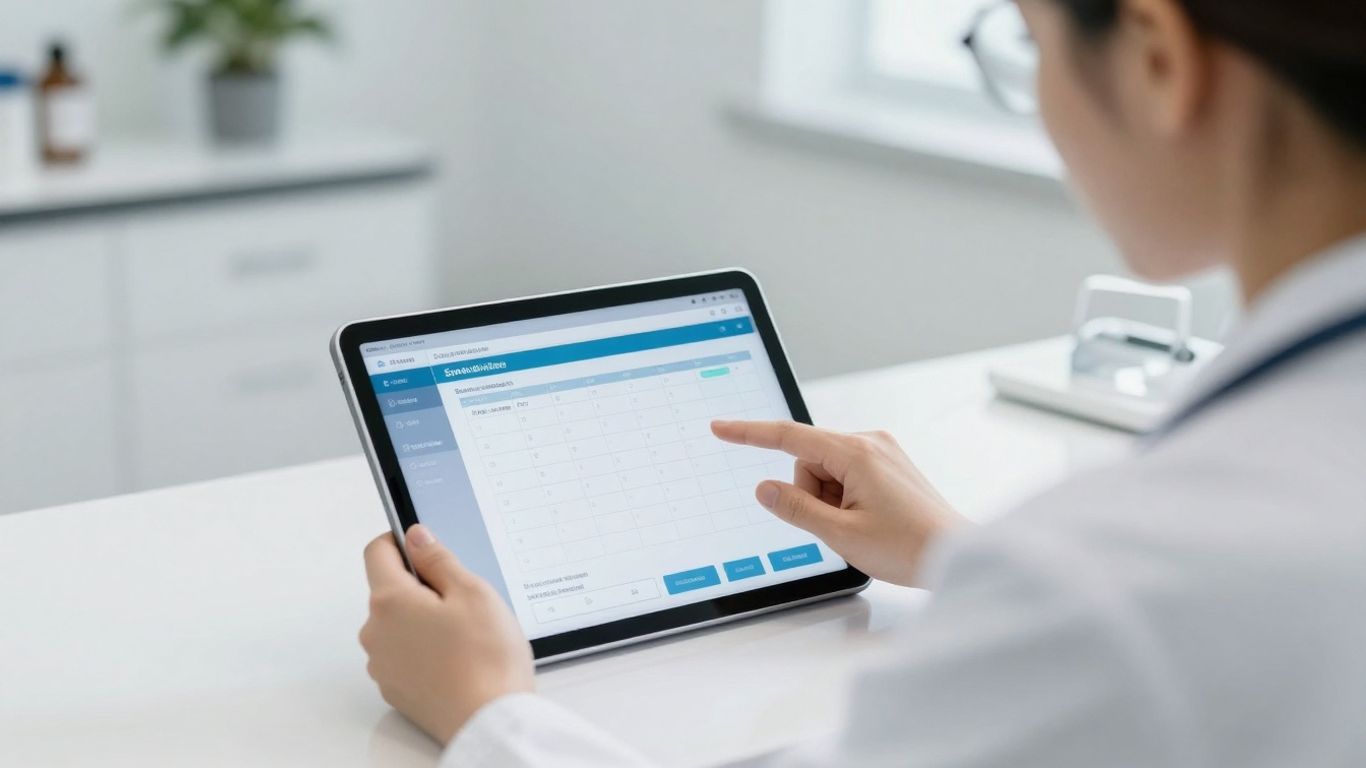
A CRM can act as a central hub for both incoming and outgoing referrals, ensuring that no patient is overlooked and that communication with other healthcare professionals remains clear.
Here’s how a CRM can help:
Centralised tracking: Log each referral, including the source, destination, reason and key patient details, creating a clear record.
Automated follow-ups: Set reminders to check whether the patient attended their referral appointment and to follow up with the referring clinician where appropriate.
Referral source analysis: See which referral partners send the most patients and which relationships might benefit from further communication.
Internal referrals: Manage referrals between different practitioners or departments within your own clinic, supporting a smoother patient journey.
By bringing structure to referrals, a CRM helps you build stronger professional relationships and ensures patients receive timely, appropriate care. It also provides visibility over how referrals contribute to clinic growth and patient outcomes.
10. Collecting Patient Feedback and Reviews
Understanding how patients experience your clinic is essential if you want to refine and improve your services. A CRM can help you build feedback and review requests into your routine workflow, ensuring this happens consistently rather than occasionally.
You can set up your CRM to automatically send feedback requests after appointments, inviting patients to share their experience. This is not just about collecting positive comments – it’s about identifying areas for improvement and demonstrating that you care about patient views.
Here’s how a CRM can support feedback and reviews:
Automated feedback requests: Simple surveys or rating links can be sent via email or SMS shortly after a visit, while the experience is still fresh.
Online review prompts: When a patient gives strong positive feedback, the system can invite them to leave a review on major review platforms or your clinic’s own website.
Trend tracking: Over time, you can analyse feedback for recurring themes – both positive and negative – and prioritise changes that will have the greatest impact.
Making feedback collection a regular, automated part of your workflow gives you valuable insight without overwhelming your team. It supports your online reputation, informs your patient journey design and can even guide content for your website or Google Business Profile tips articles, so that what you say online genuinely reflects what patients experience in clinic.
Your Clinic’s Path to Smoother Operations and Better Earnings
A CRM system for clinics is about far more than booking appointments. Used well, it becomes a central platform for patient management, communication and insight, helping your team work more efficiently while offering patients a safer, more consistent experience.
By organising patient data, automating routine tasks and supporting secure communication, your staff can focus on what they do best – delivering high-quality care. At the same time, the insights you gain can inform everything from treatment planning to aesthetic clinic marketing and local SEO for clinics, making sure your online presence accurately reflects how you operate.
A CRM will not replace your website or your Google Business Profile, but it can make those channels much more effective by keeping your data accurate, your processes clear and your patient communication consistent. When chosen carefully and aligned to your existing workflows, the right system gives you a strong foundation for long-term, sustainable growth without turning your clinic into a hard-sell environment.